Your premises. Your rules. Your QR code.
Whatever's already happening informally on your premises, bring it under one roof you actually control. Nothing goes live without you approving it, ever.
Free for every venue type, forever
Six venue types. Different services, different verification.
Every category below is what the actual registration wizard offers by default — editable before you go live, never locked in.
Healthcare
Hospital, clinic, diagnostic centre
- Food
- Services
Tiffin and food delivery for families waiting around. Verified local services for anyone visiting.
To verify your venue
- PAN
- GST
- Clinical Establishment Registration
- Incorporation (optional)
Hospitality
Hotel, resort, guesthouse
- Food
- Accommodation
- Services
In-room ordering beyond your own kitchen, plus verified local services for guests — drivers, tours, laundry.
To verify your venue
- PAN
- GST
- FSSAI
- Trade License
Education
College, campus, hostel block
- Food
- Services
Route hostel food orders and campus-friendly services through rules you actually set.
To verify your venue
- PAN
- Incorporation
- Education Affiliation
- GST (optional)
Corporate
Office, business park
- Food
- Services
Daily lunch delivery to a floor, a chai cart at reception, a courier who shows up on time.
For offices and business parks →
To verify your venue
- PAN
- GST
- Incorporation
- Shop & Establishment (optional)
Industrial
Factory, industrial park
- Services
Verified local services reaching your workforce, without needing physical access to a secured site.
To verify your venue
- PAN
- GST
- Factory License
- Incorporation
Residential
Society, apartment complex, gated community
- Food
- Services
The milkman, the chai stall, the tiffin service half your building already uses — verified once, trusted every day after.
To verify your venue
- Society / RWA Registration
- PAN (optional)
- Incorporation (optional)
Four steps. Nothing hidden between them.
01
Venue Details
Name, address, hours, contact — and your venue type, which pre-loads the right categories.
02
Categories
Confirm or adjust which categories you want. Nothing's locked in by your venue type.
03
Vendors
A short explainer on how vendors will reach you — applying, or being invited directly.
04
Review & go live
Your QR code is generated the moment you finish. Verification runs in parallel.
Your own dashboard, from day one.
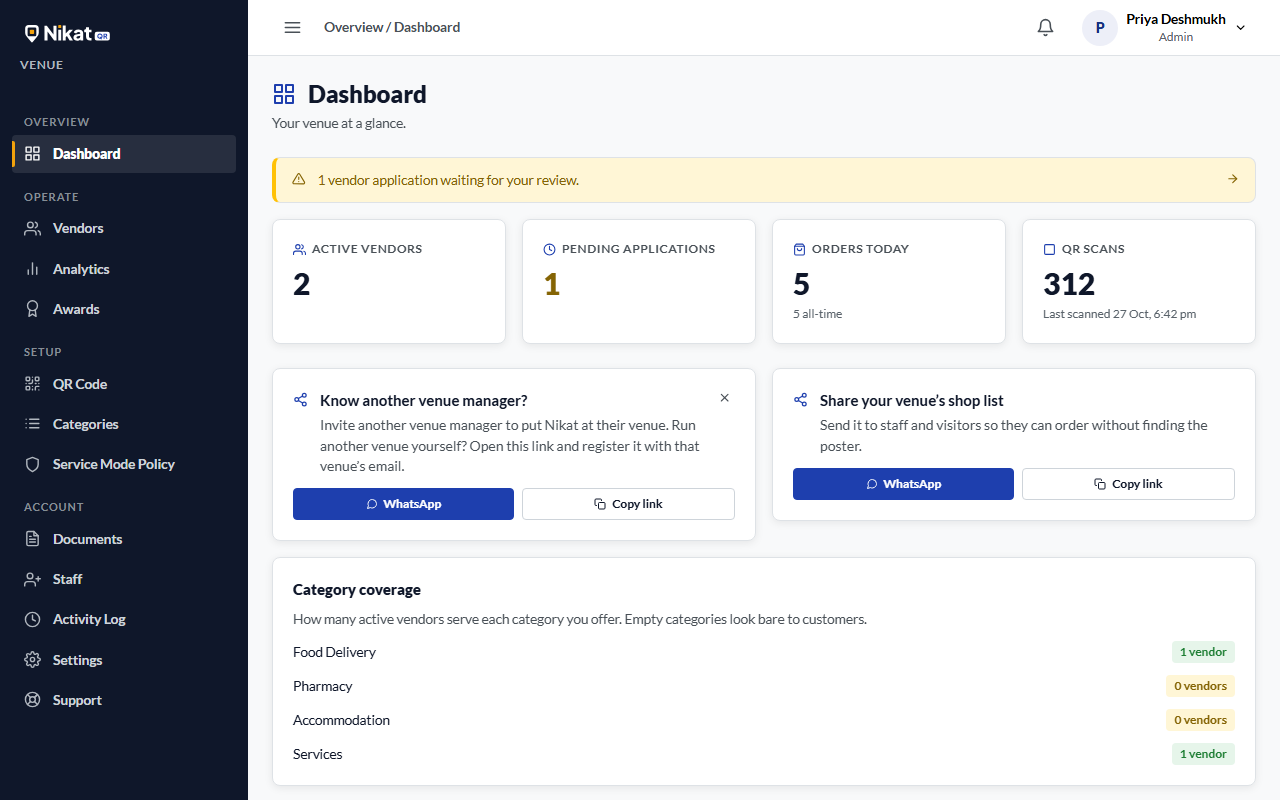
Active vendors, pending applications, category coverage — one screen.
A demo hospital venue in the real dashboard, with a vendor waiting on a decision. Yours looks like this the day you go live.
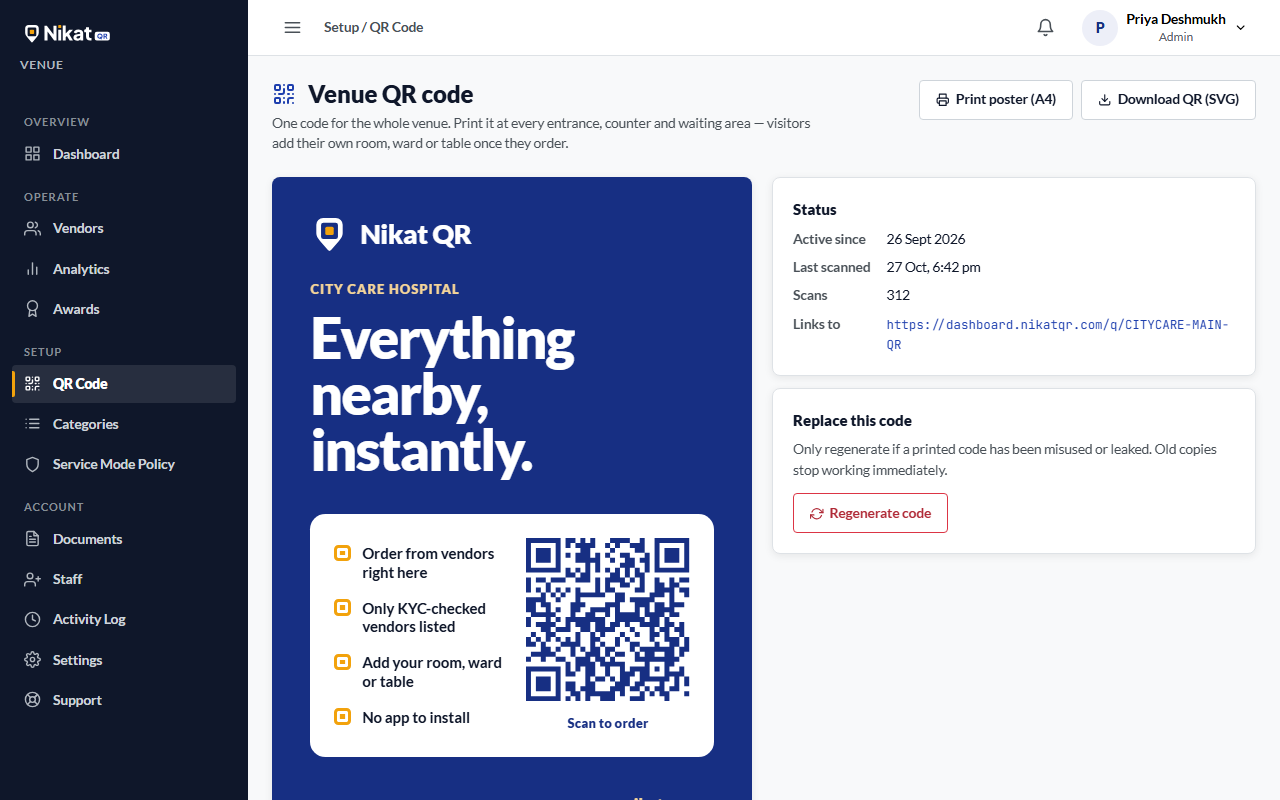
One QR code. Print it anywhere on your premises.
The same code works at every entrance, counter, or waiting area — visitors add their own room or table when they order. Print the ready-made A4 poster or download the code as a vector file, and regenerate it if a copy is ever misused.
What you actually control, after you're live.
Approve or invite every vendor, individually
Review an inbound application with its documents attached, or invite a specific vendor yourself with a one-time shareable link — accepting it is the approval.
Suspend or remove a vendor, anytime
No waiting period — a vendor who stops meeting your standard comes off your QR code the moment you decide.
A real activity log — every governance action, timestamped
Every approval, suspension, QR regeneration, and staff change is recorded — visible to you, forever.
Your QR code is yours — regenerate it whenever you need to
Download as a real vector file. Regenerate in one click for any reason.
Turn categories on or off, whenever your needs change
Started with just Food? Add Services the day you decide you want it.
Who is registering a venue on Nikat QR actually for?
- ✓You want to know exactly who's reaching your patients, students, residents, or employees — not just hope they behave.
- ✓You'd rather review a vendor once, properly, than keep fielding complaints about whoever's cart showed up this week.
- ✓You want control, not a directory — a clear yes or no on who's allowed in, decided by you.
- ✓Free actually matters — a standard registration costs you nothing, now or later, because managing vendor access was never supposed to be a line item in your budget.
- ✓You run a large or busy premises — a resort, campus, hospital, business park or a builder's project — and want a dedicated installation on a custom model: commission-based, revenue-sharing, or one built around how you already run.
- –You want a standard, free registration to pay you on its own — earnings come only through a usage-based partnership or a dedicated installation, agreed with our team up front.
- –You want Nikat QR to police vendor quality day to day — KYC confirms a business is real, not that it's good. That judgment stays yours.
- –Your premises has no mobile data or Wi-Fi — Nikat QR needs one of them to work.
Before you register, the honest answers.
Does this ever cost anything?
No. A standard registration is free for every venue type, now and later. Nikat QR's fee is charged to vendors, never to you.
Can my venue earn from Nikat QR?
Yes, in two ways. Large venues that actively promote Nikat QR can be offered a paid partnership, based on how much it is actually used there. And for resorts, campuses, hospitals, business parks and builders, we set up a dedicated installation on a custom model — commission-based, revenue-sharing, or whatever fits how you already run. Tell us about your premises and we will put a proposal together.
Can I get paid just for putting up the QR poster?
No. Displaying the code on its own is not paid. Earnings come only from a usage-based partnership or a dedicated installation agreed with our team.
We're a builder or a housing society. Is there something for us?
Yes. We offer co-branded posters, with your project or society name next to Nikat QR, on a revenue-sharing model. Tell us how many buildings or flats you have.
What if a vendor misbehaves after I've approved them?
Suspend or remove them immediately — no waiting period. They come off your QR code the moment you decide.
Does it work without internet?
No. Nikat QR needs mobile data or Wi-Fi — either works. If your premises has guest Wi-Fi, visitors can use that.
Can individual helpers at my premises — cooks, drivers, house help — join?
Not yet. Onboarding for individual helpers without a registered business is being built. Registered businesses can join as vendors today.
What if my venue doesn't fit neatly into one of the six types?
Pick the closest match at registration, then adjust your categories directly in Step 2 — the venue type only sets a starting point.
Can other venues see my vendors or my residents' activity?
No. Every venue is fully isolated — a venue admin only ever sees their own premises’ data.
What happens while my documents are still being verified?
Your QR code exists the moment you finish registration — verification runs in parallel.
How do I talk to someone?
Call or WhatsApp +91 866 933 6161, or email support@urbanweb.host. We answer from 10 am to 10 pm.